
PC Version PC Version
Try playing MONGIL: STAR DIVE on PC too!
How to Play the PC Version
- STEP 1
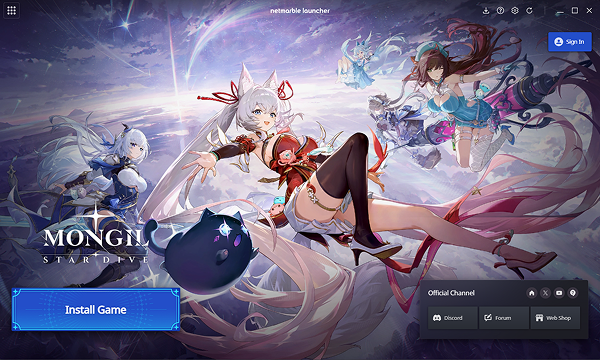
Run the downloaded .EXE file to install and launch the Netmarble Launcher.
- STEP 2
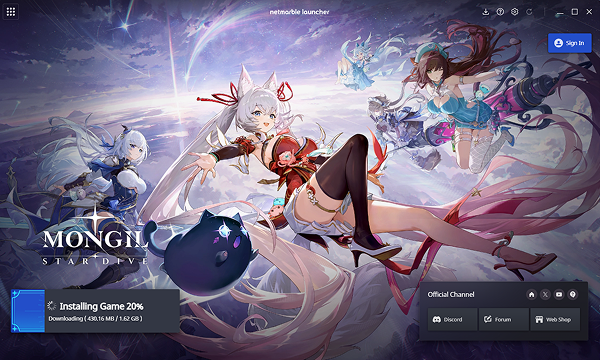
When Netmarble Launcher opens, review the installation options in the MONGIL: STAR DIVE installation pop-up and press "Start Install."
- STEP 3
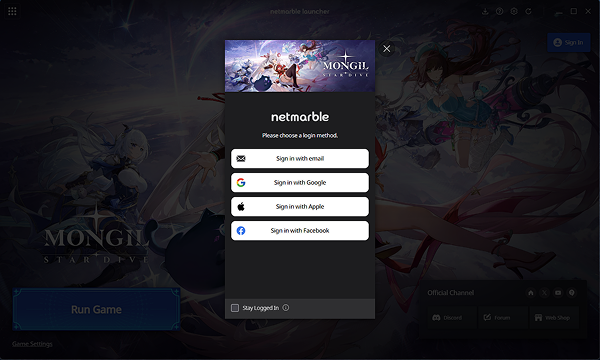
Please log in or sign up for an account via the Netmarble Launcher.
If you check "Keep me logged in," you will be automatically logged in when you exit and relaunch the Netmarble Launcher. - STEP 4
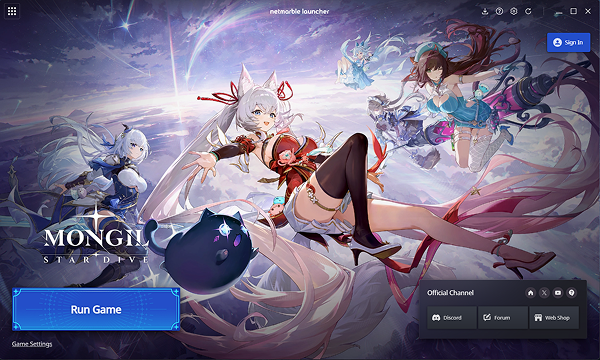
Once you've logged in, press the "Launch Game" button
and start playing MONGIL: STAR DIVE!
PC Version System Requirements
| Category | Minimum | Recommended |
|---|---|---|
| CPU | Intel Core™ i5 7th Gen / AMD Ryzen™ 5 2600 | Intel Core™ i7 9th Gen / AMD Ryzen™ 7 3700 |
| RAM | 8GB RAM | 16GB RAM |
| GPU | NVIDIA GeForce™ GTX 1060 / AMD Radeon™ RX 580 / Intel Arc™ A380 Graphics | NVIDIA GeForce™ RTX 2060 / AMD Radeon™ RX 5700XT / Intel Arc™ A750 Graphics |
| Operating System | Windows 10 | Windows 11 |
| Hard Drive | 20GB | 50GB |
FAQ
Please read below for details regarding the PC release!
For any further questions, please contact customer service!